全国高分辨率土地利用数据服务 土地利用数据服务 土地覆盖数据服务 坡度数据服务 土壤侵蚀数据服务 全国各省市DEM数据服务 耕地资源空间分布数据服务 草地资源空间分布数据服务 林地资源空间分布数据服务 水域资源空间分布数据服务 建设用地空间分布数据服务 地形、地貌、土壤数据服务 分坡度耕地数据服务 全国大宗农作物种植范围空间分布数据服务
多种卫星遥感数据反演植被覆盖度数据服务 地表反照率数据服务 比辐射率数据服务 地表温度数据服务 地表蒸腾与蒸散数据服务 归一化植被指数数据服务 叶面积指数数据服务 净初级生产力数据服务 净生态系统生产力数据服务 生态系统总初级生产力数据服务 生态系统类型分布数据服务 土壤类型质地养分数据服务 生态系统空间分布数据服务 增强型植被指数数据服务
多年平均气温空间分布数据服务 多年平均降水量空间分布数据服务 湿润指数数据服务 大于0℃积温空间分布数据服务 光合有效辐射分量数据服务 显热/潜热信息数据服务 波文比信息数据服务 地表净辐射通量数据服务 光合有效辐射数据服务 温度带分区数据服务 山区小气候因子精细数据服务
全国夜间灯光指数数据服务 全国GDP公里格网数据服务 全国建筑物总面积公里格网数据服务 全国人口密度数据服务 全国县级医院分布数据服务 人口调查空间分布数据服务 收入统计空间分布数据服务 矿山面积统计及分布数据服务 载畜量及空间分布数据服务 农作物种植面积统计数据服务 农田分类面积统计数据服务 农作物长势遥感监测数据服务 医疗资源统计数据服务 教育资源统计数据服务 行政辖区信息数据服务
Landsat 8 高分二号 高分一号 SPOT-6卫星影像 法国Pleiades高分卫星 资源三号卫星 风云3号 中巴资源卫星 NOAA/AVHRR MODIS Landsat TM 环境小卫星 Landsat MSS 天绘一号卫星影像





在 ToolBarControl 控件中,我们通过 ToolBarControl 控件的属性页面添加了一些如打开文档,平移,放 大等功能,在 ArcGIS Engine 中我们将宿主在 ToolBarControl 控件中的内容分为三类“命令,工具,工具控 件“。
命令,就是当用户单击时所产生的操作,比如说,我们要打开一个地图文档,我们只需要在ToolBarControl 控件上添加打开地图文档这个操作,然后用鼠标点击。
工具,存在着交互这个操作。当我们在 ToolBarControl 控件上使用一个工具的时候,我们需要通过两 步操作:
(1)单击这个工具;
(2)使用这个工具更相应的控件做交互操作。
如果我们点击了平移这个操作,那么这个时候我们还要用鼠标和地图进行平移等交互,那和谁交互呢,我们知道 ToolBarControl 有一个 buddy 属,这个就体现了在 buddy 属性上。ToolbarControl 会将伙伴控件的 CurrentTool 属性设置为我们用鼠标点击的工具,然后伙伴控件就等着和我们的工具交互。工具控件,这通 常是用户界面组件,如 ToolBarControl 控件上的列表框和组合框。其实在 ToolBarControl 控件中还可以宿主 工具条菜单(ToolbarMenu),工具条菜单表示单击命令项的一个垂直列表。用户必须选择工具条菜单上的 一个命令项,或单击工具条菜单之外的地方使其消失。工具条菜单只能驻留命令项(不允许驻留工具或者工 具控件)
命令和工具
在 ArcGIS Engine 中,命令是实现了 ICommand 接口,在 ArcGIS Engin 的开发帮助中,我们可以看到ICommand 接口以下成员:
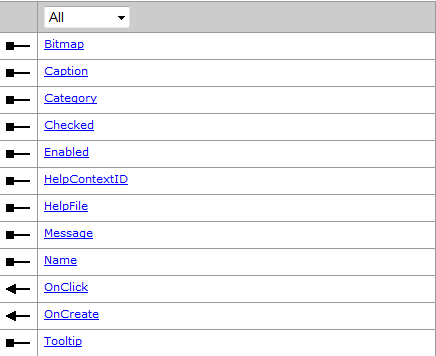
当用户单击这个命令时会导致 ICommand.OnClick 方法被调用,并执行某种操作。要将一个命令宿主到ToolBarControl 控件上,有以下三种方法:
使用 UID
使用 progID
使用 ICommand
UID pUID = new UIDClass ();
pUID.Value = "esriControls.ControlsUndoCommand";
axToolbarControl1.AddItem (pUID, - 1, 0, false, - 1, esriCommandStyles.esriCommandStyleIconOnly);
axEditorToolbar.AddItem ("esriControls.ControlsUndoCommand", 0, - 1, true, 0, esriCommandStyles.esriCommandStyleIconOnly);
ICommand pUndo = new ControlsUndoCommandClass ();
axEditorToolbar.AddItem (pUndo, 0, - 1,false, 0,esriCommandStyles.esriCommandStyleIconOnly);
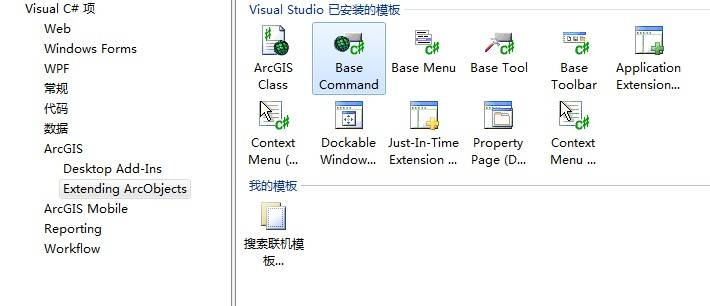
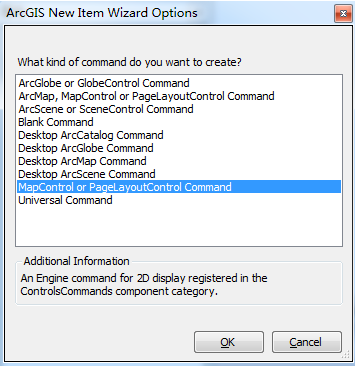
ICommand 接口是可以被扩展的,也就是说这个接口对我们是开放的,只要我们将 ICommand 接口中 成员实现,因为这个格式是固定的,Esri 提供了相应的模板,如下图:
我们知道宿主在 ToolBarControl 上的命令操作的对象是 ToolBarControl 的伙伴控件,但是,这个命令怎么和 这个伙伴控件联系起来了,注意到 ICommand 接口中有一个 ICommand.OnCreate 方法,这个方法有一个参 数 hook。
public void OnCreate (
object hook
}
这个 hook 是一个 object 对象。也就是说这儿命令和那个控件协作,要看这个 hook 传入的是那种控件。 当命令 对象 宿主到 ToolBarControl 控件上后就 会立 即调用 ICommand.OnCreate 方法 ,同 时会 将 ToolBarControl 控件传递给 hook 这个参数,以便命令能和 ToolBarControl 控件的伙伴控件协作。一般要在 这个方法里面要测试这个 hook 是不是有效,也就是说这个命能不能和这个 hook 协作,要看这个命令支不 支持这样的操作,比如说我们要打开一个地图文档,我们知道打开地图文档这个命令是可以和 MapControl, PageLayoutControl 控件协作的,如果我们传进去的是 TOCContro 控件,那么这个命令就会失效,这些话看 起来很费解,我们通过一个代码来好好体会这些话。我们自己定义一个打开地图文档的命令,利用 Esri 提 供的命令模板,如下:
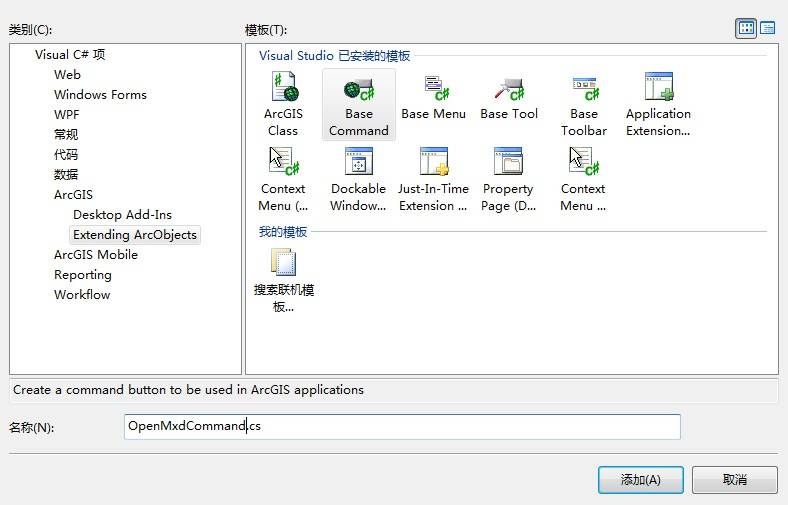
选择和命令对象协作的控件
using System;
using System.Drawing;
using System.Runtime.InteropServices;
using System.Windows.Forms;
using ESRI.ArcGIS.ADF.BaseClasses;
using ESRI.ArcGIS.ADF.CATIDs;
using ESRI.ArcGIS.Carto;
using ESRI.ArcGIS.Controls;
namespace EngineApplication {
/// Summary description for OpenMxdCommand.
[Guid ("c142fea5-2e8e-4f68-95e1-9cad4a6a290e")]
[ClassInterface (ClassInterfaceType.None)]
[ProgId ("CalculateContourTask.OpenMxdCommand")]
public sealed class OpenMxdCommand : BaseCommand {
#region COM Registration Function (s)
[ComRegisterFunction ()]
[ComVisible (false)]
static void RegisterFunction (Type registerType) {
// Required for ArcGIS Component Category Registrar support
ArcGISCategoryRegistration (registerType);
//
// TODO: Add any COM registration code here
//
}
[ComUnregisterFunction ()]
[ComVisible (false)]
static void UnregisterFunction (Type registerType) {
// Required for ArcGIS Component Category Registrar support
ArcGISCategoryUnregistration (registerType);
//
// TODO: Add any COM unregistration code here
//
}
#region ArcGIS Component Category Registrar generated code
/// Required method for ArcGIS Component Category registration -
/// Do not modify the contents of this method with the code editor.
private static void ArcGISCategoryRegistration (Type registerType) {
string regKey = string.Format ("HKEY_CLASSES_ROOT\\CLSID\\{{{0}}}", registerType.GUID);
ControlsCommands.Register (regKey);
}
/// Required method for ArcGIS Component Category unregistration -
/// Do not modify the contents of this method with the code editor.
private static void ArcGISCategoryUnregistration (Type registerType) {
string regKey = string.Format ("HKEY_CLASSES_ROOT\\CLSID\\{{{0}}}", registerType.GUID);
ControlsCommands.Unregister (regKey);
}
#endregion
#endregion
IMapControl2 pMapControl;
public OpenMxdCommand () {
//
// TODO: Define values for the public properties
//
base.m_category = "打开地图文档"; //localizable text
base.m_caption = "打开地图文档"; //localizable text
base.m_message = "打开地图文档"; //localizable text
base.m_toolTip = "打开地图文档"; //localizable text
base.m_name = " 打开地图文档"; //unique id , non-localizable (e.g. "MyCategory_MyCommand")
try
{
//
// TODO: change bitmap name if necessary
//
string bitmapResourceName = GetType ().Name + ".bmp";
base.m_bitmap = new Bitmap (GetType (), bitmapResourceName);
} catch (Exception ex) {
System.Diagnostics.Trace.WriteLine (ex.Message, "Invalid Bitmap");
}
}
#region Overridden Class Methods
/// Occurs when this command is created
public override void OnCreate(object hook)
{
if (hook == null) return;
//在这里对hook进行判断
if (hook is IToolbarControl)
{
IToolbarControl pToolBar = hook as IToolbarControl;
pMapControl = pToolBar.Buddy as IMapControl2;
} else if (hook is IMapControl2)
{
pMapControl = hook as IMapControl2;
}
// TODO: Add other initialization code
}
/// Occurs when this command is clicked
public override void OnClick ()
{
// TODO: Add OpenMxdCommand.OnClick implementation
//launch a new OpenFile dialog
OpenFileDialog pOpenFileDialog = new OpenFileDialog ();
pOpenFileDialog.Filter = "Map Documents (*.mxd)|*.mxd";
pOpenFileDialog.Multiselect = false;
pOpenFileDialog.Title = "Open Map Document";
if (pOpenFileDialog.ShowDialog () == DialogResult.OK)
{
string docName = pOpenFileDialog.FileName;
IMapDocument pMapDoc = new MapDocumentClass ();
if (pMapDoc.get_IsPresent (docName)&&!pMapDoc.get_IsPasswordProtected (docName))
{
pMapControl.LoadMxFile (pOpenFileDialog.FileName, null, null);
// set the first map as the active view
pMapControl.ActiveView.Refresh();
pMapDoc.Close ();
}
}
}
#endregion
}
}
通过下面两句将我们自定义的打开地图文档的命令宿主到 ToolBarControl 上
OpenMxdCommand pMxdCommand = new OpenMxdCommand ();
axToolbarControl1.AddItem (pMxdCommand, -1, 0, false, -1, esriCommandStyles.esriCommandStyleIconOnly);
运行结果
使用该命令后,效果如下:

我们可以对上述代码添加断点,发现当程序执行到 axToolbarControl1.AddItem(pMxdCommand, -1, 0, false, -1, esriCommandStyles.esriCommandStyleIconOnly);的时候,OnCreate 函数被执行,进而对 hook 参数判断,通过进一步跟踪,发现程序执行到
if (hook is IToolbarControl)
{
IToolbarControl pToolBar= hook as IToolbarControl ;
pMapControl = pToolBar.Buddy as IMapControl2;
}
说明程序将 ToolbarControl 控件传入进去。
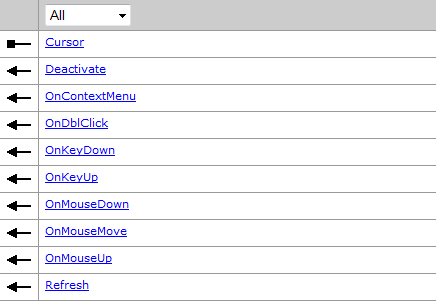
工具是实现了 Itool 和 ICommand 这两个接口,ITool 接口的成员几乎都是和交互相关的一些事件, 从 ITool 的接口成员中我们就不难看出工具和命令的区别: