
全国高分辨率土地利用数据服务 土地利用数据服务 土地覆盖数据服务 坡度数据服务 土壤侵蚀数据服务 全国各省市DEM数据服务 耕地资源空间分布数据服务 草地资源空间分布数据服务 林地资源空间分布数据服务 水域资源空间分布数据服务 建设用地空间分布数据服务 地形、地貌、土壤数据服务 分坡度耕地数据服务 全国大宗农作物种植范围空间分布数据服务
多种卫星遥感数据反演植被覆盖度数据服务 地表反照率数据服务 比辐射率数据服务 地表温度数据服务 地表蒸腾与蒸散数据服务 归一化植被指数数据服务 叶面积指数数据服务 净初级生产力数据服务 净生态系统生产力数据服务 生态系统总初级生产力数据服务 生态系统类型分布数据服务 土壤类型质地养分数据服务 生态系统空间分布数据服务 增强型植被指数数据服务
多年平均气温空间分布数据服务 多年平均降水量空间分布数据服务 湿润指数数据服务 大于0℃积温空间分布数据服务 光合有效辐射分量数据服务 显热/潜热信息数据服务 波文比信息数据服务 地表净辐射通量数据服务 光合有效辐射数据服务 温度带分区数据服务 山区小气候因子精细数据服务
全国夜间灯光指数数据服务 全国GDP公里格网数据服务 全国建筑物总面积公里格网数据服务 全国人口密度数据服务 全国县级医院分布数据服务 人口调查空间分布数据服务 收入统计空间分布数据服务 矿山面积统计及分布数据服务 载畜量及空间分布数据服务 农作物种植面积统计数据服务 农田分类面积统计数据服务 农作物长势遥感监测数据服务 医疗资源统计数据服务 教育资源统计数据服务 行政辖区信息数据服务
Landsat 8 高分二号 高分一号 SPOT-6卫星影像 法国Pleiades高分卫星 资源三号卫星 风云3号 中巴资源卫星 NOAA/AVHRR MODIS Landsat TM 环境小卫星 Landsat MSS 天绘一号卫星影像





Polyline 对象是由一个或多个相连或者不相连的 path 对象的有序集合,通常用来代表线状地物如道路 , 河流 , 管线等等. 该对象在ArcGIS Engine中的模型图如下 :
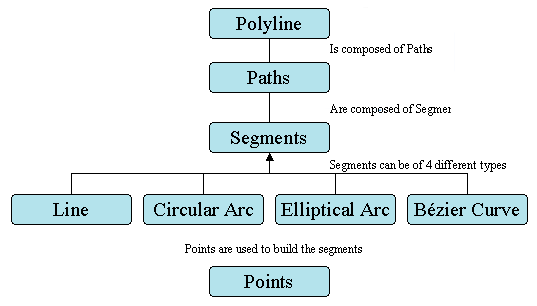
在这个模型中,我们看到某些几何对象可以组合产生新的几何形体,如 polyline 又 path 构成,path 又可以由 segement 组成,但是这并不意味着用户必须按照这种层次去构造 polyline,实际上 Point 集合 直接构成 Polyline,组成 Polyline 的这些路径既可以是连续的,也可以是不连续的,如下图:
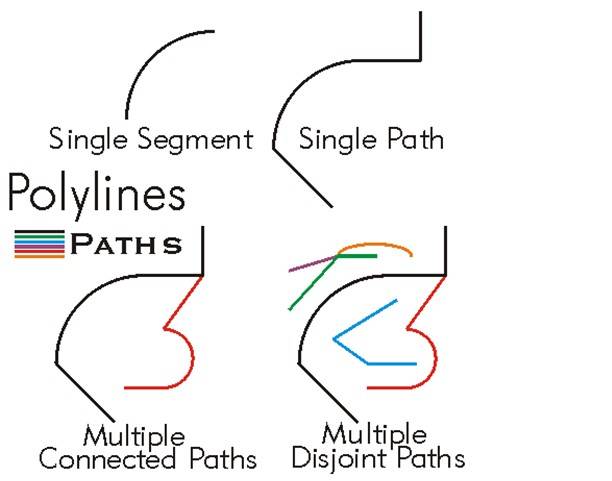
Polyline 是有序 path 组成的集合,可以拥有 M、Z 和 ID 属性值,Polyline 对象的 IPointCollection 接口包含了所有的节点信息,IGeometryCollection 接口可以获取 polyline 的 paths,ISegmentCollection 接口可以获取 polyline 的 segments。
一个 Polyline 对象必须满足以下准则:
组成 Polyline 对象的所有 Path 对象必须是有效的。
组成 Polyline 对象的所有 Path 对象不能重合,相交或自相交。
组成 Polyline 对象的多个 Path 对象可以连接与某一点,也可以分离。
Path 对象的长度不能为 0.
IPolyline 是 Polyline 类的主要接口,IPolyline 的 Reshape 方法可以使用一个 Path 对象为一个Polyline 对象整形,IPolyline 的 SimplifyNetwork 方法用于简化网络。Polyline 对象可以使用 IGeometryCollection 接口添加 Path 对象的方法来创建,使用该接口需注意 以下情况:
每一个 Path 对象必须是有效的,或使用 IPath::Simplify 方法后有效。
由于 Polyline 是 Path 对象的有序集合,所以添加 Path 对象时必须注意顺序和方向。
为了保证 Polyline 是有效的,可以创建完 Polyline 对象后使用 ITopologicalOperator 接口的Simplify 方法。
下面代码片段演示了一个 Polyline 的构成:
private object pMissing = Type.Missing;
public IGeometry GetPolylineGeometry()
{
const double PathCount = 3;
const double PathVertexCount = 3;
IGeometryCollection pGeometryCollection = new PolylineClass();
for (int i = 0; i < PathCount; i++)
{
IPointCollection pPointCollection = new PathClass();
for (int j = 0; j < PathVertexCount; j++)
{
pPointCollection.AddPoint(GetPoint(), ref pMissing, ref pMissing);
}
pGeometryCollection.AddGeometry(pPointCollection as IGeometry, ref pMissing,ref pMissing);
}
return pGeometryCollection as IGeometry;
}
private IPoint GetPoint()
{
const double Min = -10;
const double Max = 10;
Random random = new Random();
double x = Min + (Max - Min) * random.NextDouble();
double y = Min + (Max - Min) * random.NextDouble();
return ConstructPoint(x, y);
}


